


Wikipedia:Reference desk/Archives/Computing/2016 December 1
| Computing desk | ||
|---|---|---|
| < November 30 | << Nov | December | Jan >> | December 2 > |
| Welcome to the Wikipedia Computing Reference Desk Archives |
|---|
| The page you are currently viewing is an archive page. While you can leave answers for any questions shown below, please ask new questions on one of the current reference desk pages. |
December 1
[edit]Generalization of Pell's Eequations
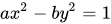
[edit]Hi, I am looking for an efficient algorithm for solving diophanite equation of the form , where a,b are positive integer parameters, and x,y are the variables, and are constrained to be integers. Thanks in advance! 212.179.21.194 (talk) 14:12, 1 December 2016 (UTC)
- Do you mean Diophantine?--213.205.252.104 (talk) 01:48, 2 December 2016 (UTC)
- Yes, it was a typo.. 31.154.81.50 (talk) 08:02, 2 December 2016 (UTC)
- Bézout's identity#Structure of solutions is the first obvious step. But then I am not sure there is an easy way to check for solutions that are squares of integers. TigraanClick here to contact me 09:19, 2 December 2016 (UTC)
Excel
[edit]I'm trying to get the largest value in a column except certain values in that column. I apply conditional formatting to the values I want to ignore: Format Cells > Number > Text. Doing so, I'm assured by the dialog box that "Text format cells are treated as text even when a number is in the cell. The cell is displayed exactly as entered."
And the cell is indeed displayed exactly as entered (just the number and nothing else), but this formatting does not affect the cells in any way except for changing their default alignment from right to left (which I can easily change back to right anyways). The values in question are still not ignored either when the largest of them is selected or when they are sorted my magnitude.
I'm aware of the TEXT() function, and I've tried it and it works, but it requires another column, which I don't wish to have. How can I force Excel to actually treat as text the selected values in the same column, as if they're produced by TEXT()? --Szerekes (talk) 19:56, 1 December 2016 (UTC)
- That's odd because my old version of Excel ignores cells formatted as text when finding the maximum in a column, and it sorts text last, not on number value. Have Microsoft changed the behaviour in newer versions? Dbfirs 20:32, 1 December 2016 (UTC)
- This doesn't work in (at least) later versions of excel because numbers formatted as text are still treated as numbers, unless converted to text using =TEXT().
- What you can try as a workaround is inserting conditions you want to apply directly into the =MAX() formula itself. To do that you need to use an array formula (you enter array formulas by pressing Ctrl+Shift+Enter instead of just Enter). For example, formula =MAX(IF(A:A<8000;A:A)) returns the largest of values in column A that is smaller than 8000. Remember, that you will have to press Ctrl+Shift+Enter to make the formula work and press Ctrl+Shift+Enter every time you edit the formula. More about array formulas and examples here. No longer a penguin (talk) 11:19, 2 December 2016 (UTC)
- ... or use Excel 2000 which doesn't treat numbers in cells formatted as text as numerical. I know I'm sixteen years out of date! Dbfirs 18:24, 2 December 2016 (UTC)
- Thanks. Unfortunately older Excels lack the capacity and some functionalities I need. So, in the newer versions, what does the formatting as "text" really do? --Szerekes (talk) 16:49, 4 December 2016 (UTC)
- ... or use Excel 2000 which doesn't treat numbers in cells formatted as text as numerical. I know I'm sixteen years out of date! Dbfirs 18:24, 2 December 2016 (UTC)